These instrucitons will help you install a network printer on your Forestry supported computer.
To Add a Forestry network printer:
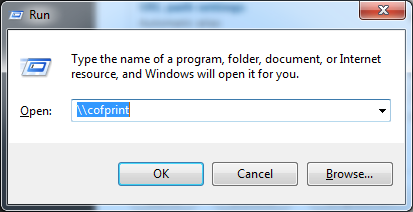
1. Click on the Start button and select "Run" (or press Windows key + R).
2. Type in \\cofprint and press OK.
a. If you are on a non-domain computer, you may need to use the fully qualified server name - \\cofprint.forestry.oregonstate.edu
3. Double-click on the name of the printer you want to add. As long as you have the appropriate permissions for that printer, the print driver will install.
You may now print to the newly added printer!
Important: These steps assume that your computer is connected to the OSU Network - directly with a registered ethernet connection, via wireless on OSU_Access or OSU_Secure, or with a VPN connection before proceeding.
Printer prefixes:
- COF_ : printers available for all Supported Users - unlimited BW, Color queues decriment $35 allotment at 15 cents per letter page
- PUB_ : printers are cost recovery and will charge to your OSU account - primarily for undergraduate printing
- FOR_ : printers for workgroups or departments - need to obtain permission before being able to add
- ODFW : printers owned by ODFW partners
- CFSL : printers owned by USFS partners
Related Pages: